Master Office Suites & Productivity
Transform your skills with our complete 7-course learning path. From quick productivity hacks to advanced project mastery in Microsoft 365 Copilot, Google Workspace, and LibreOffice.
Start Learning NowYour Complete Learning Journey
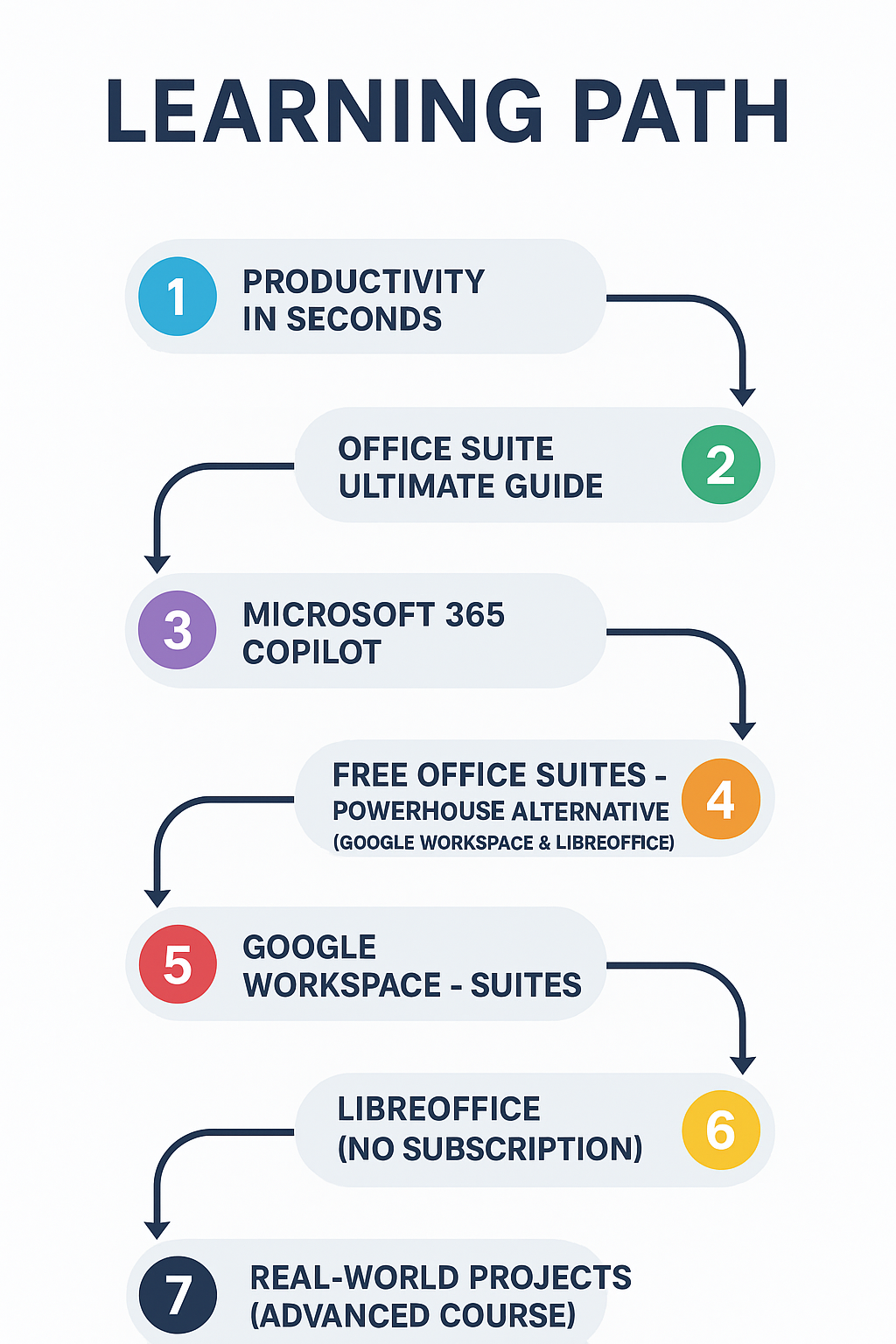
TIER 1: QUICK WINS & FOUNDATIONS
Start here for immediate productivity boosts and to choose your path
Productivity in Seconds
90-second videos & power hacks for immediate results. Master Windows shortcuts and browser tricks.
Watch Course on YouTubeAccess Course HERE!
TIER 2: THE CROSSROADS - CHOOSE YOUR SUITE
This is the core decision-making hub
Office Suite ULTIMATE Guide
Head-to-head comparisons of Cost, Features, AI, and Collaboration to pick your perfect tool.
Watch Course on YouTubeAccess Course HERE!
TIER 3: DEEP SPECIALIZATION
Follow your chosen path to mastery
Microsoft 365 Copilot
Leverage AI to automate Word, Excel, and PowerPoint. Work smarter and 10x faster.
Watch Course on YouTubeAccess Course HERE!
FREE Office Suites - Powerhouse Alternatives
Ditch subscriptions with powerful, completely free alternatives to paid software.
Watch Course on YouTubeAccess Course HERE!
Google Workspace - Suites
Cloud-first & collaborative. Master Docs, Sheets, and Slides from any device.
Watch Course on YouTubeAccess Course HERE!
LibreOffice (NO Subscription)
Powerful & offline. The ultimate free desktop alternative for total control.
Watch Course on YouTubeAccess Course HERE!
TIER 4: MASTERY & APPLICATION
Where skills meet real-world challenges
Real-World Projects (Advanced Course)
Apply everything you've learned. Build impressive, portfolio-ready projects with advanced data analysis.
Watch Course on YouTubeAccess Course HERE!
Featured Course: Microsoft 365 Copilot
Course Details
Microsoft 365 Copilot: Zero to AI-Powered Pro
Most PopularAbout This Course
Unlock the full potential of AI in Microsoft Office! This complete course takes you from Copilot beginner to power user. Learn to automate Word, Excel, and PowerPoint, write better content, analyze data instantly, and create stunning presentations in minutes.
What You'll Learn
- How to use Copilot across Word, Excel, and PowerPoint
- Time-saving prompts and commands for real-world tasks
- Advanced data analysis in Excel with AI assistance
- How to generate entire presentations from a single prompt
Course Content
Watch Lesson on YouTube
Watch Lesson on YouTube
Watch Lesson on YouTube